
Avoid messy spreadsheets and mistakes. Convert your bank statement PDF to Excel instantly, ensuring accurate data for budgeting, tax filing, and business accounting without errors.
We prioritise confidentiality and the integrity of your data. We adhere to strict
compliance standards including GDPR, SOC 2, and HIPAA.
Privacy Policy
Our integration makes handling PDF Bank Statements effortless, turning scattered documents into organized, usable data in just a few steps. Connect your workflow, upload your statements, and let the system extract key details securely and accurately, so you spend less time on manual entry and more time making decisions.
Unmatched precision in data extraction from leading banks worldwide.
Upload and convert multiple files in seconds.

Affordable Plans for Everyone tailored to meet diverse needs without breaking the bank, offering flexibility and value for all.
No installation needed—it runs entirely in-browser and works even with messy, multi-page documents
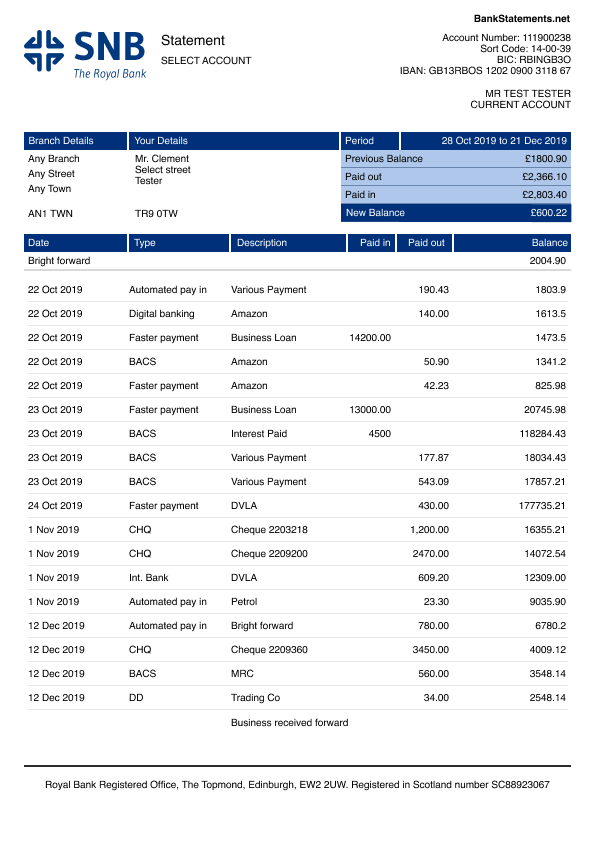
A bank statement PDF to Excel converter is a tool that transforms PDF bank statements into Excel or CSV for easy access and analysis. It automatically extracts key transaction details like dates, amounts, and descriptions, eliminating the need for manual data entry.
This converter saves time and reduces errors, making it ideal for bookkeeping, tax preparation, and financial management. Whether you need to organize personal finances or streamline business accounting, a PDF to CSV converter helps keep everything structured and accessible.
Dealing with bank statements in PDF format is a headache. You can’t edit, sort, or analyze them easily. A PDF to Excel converter bank statement fixes that by turning messy PDFs into clean, organized CSV or Excel files. Here’s why it’s worth using:
PDF bank statements are frustrating to work with. They’re unstructured and full of formatting issues. Converting them to Excel or CSV lets you filter, sort, and organize transactions in seconds.
PDFs are not editable or easily integrated into accounting software. Converting them to CSV, Excel, OFX, QBO, or QFX makes financial data usable.
Converting bank statements helps with GDPR compliance, improves audit accuracy, and protects sensitive financial information.
Not all PDF to Excel converters work the same way. Some are simple and free, while others use AI for advanced processing. Here are the types:
Web-based, no installation required, accessible on any device, but may have security limitations.
Installed locally, offering privacy, large file handling, and advanced features.
Basic features, limited file size, limited exports.
More accurate, supports multiple formats, bulk processing, and customer support.
Use machine learning for automatic data extraction. Great for complex documents.
Template-based, simple to use but slow and inaccurate for complex layouts.
Built for accountants, tax professionals, or financial institutions with specialized features.
| Features | Free Converters | Paid Converters |
|---|---|---|
| Cost | Free | Subscription |
| Template Setup | Basic | Customizable |
| Export Options | CSV, Excel | CSV, Excel, JSON, OFX, QBO, QFX |
| Capacity | Low volume | High volume |
| User Support | None or limited | Full support |
| API Integration | Rare | Often available |
Upload your PDF, CSV, or scanned document. AI or manual mapping extracts all data.
Ensures column accuracy, allows adjustments, and prepares export.
Fixes formatting issues and ensures accuracy.
Supports QuickBooks, Xero, Zoho Books, or manual downloads.
OCR scans and reads text from PDFs or images.
Converts text into editable Excel or CSV data.
Rebuilds rows and columns based on original layout.
Allows seamless import into accounting platforms.
AI-based OCR ensures precise results.
Supports Excel, CSV, QBO, OFX, and more.
Ideal for accountants and businesses.
Look for encryption, GDPR, SOC2, HIPAA.
Works with QuickBooks, Xero, Sage, etc.
Helps organize and analyze data.
Cloud = convenience. Offline = maximum privacy.
Use high-resolution files for best OCR accuracy.
Adjust Excel column widths, validate data, and compare with original.
Use encrypted converters with compliance certifications.
Choose tools that convert multiple files at once.
Fast, accurate, AI-powered, supports Excel, CSV, OFX, QBO with high security standards.
99.5% OCR accuracy, integrates with QuickBooks, Xero, Sage.
Budget-friendly, syncs financial documents, mobile capture.
Supports batch processing and multiple formats.
Works with PDFs, scans, OFX, QBO, CSV, Excel.
Look for encryption and compliance (GDPR, SOC2, HIPAA).
Choose based on budget, usage volume, and value.
A clean interface and reliable support are essential.
Always use clean scans.
Double-check amounts, dates, and balances.
Never upload financial data to unsafe tools.
Use tools with bulk processing.
Lorem ipsum dolor sit amet, consectetur adipisicing elit, sed do eiusmod tempor incididunt ut labore et dolore magna aliqua. Ut enim ad minim veniam, quis nostrud exercitation ullamco labor.