Convert Bank of America bank statements to Excel & CSV
Turn your Bank of America statement PDF into a clean spreadsheet in seconds — free, private, processed entirely in your browser. No upload, no signup.

Manually retyping a Bank of America statement into a spreadsheet is slow and error-prone. BankStmtConvert extracts every transaction from a Bank of America PDF — dates, descriptions, debits, credits and balances — and exports it to Excel or CSV, ready for your accounting software. Everything runs locally, so your Bank of America data never leaves your device.
Convert your Bank of America statement now →Is it risky to convert a Bank of America statement here?
No — your data is never exposed. A bank statement is sensitive, which is exactly why BankStmtConvert never uploads it. Your Bank of America PDF is read and parsed entirely inside your browser using Mozilla's open-source PDF.js — it is never sent to us, stored, or seen by anyone. There is nothing to leak and nothing to delete. You can even disconnect from the internet after the page loads and it still converts.
How to download your Bank of America statement as a PDF
- Sign in at bankofamerica.com or the app.
- Select the account → Statements & Documents.
- Download the PDF statement.
How to convert your Bank of America statement to Excel
- Open the free converter. Go to the BankStmtConvert converter — no signup, no install.
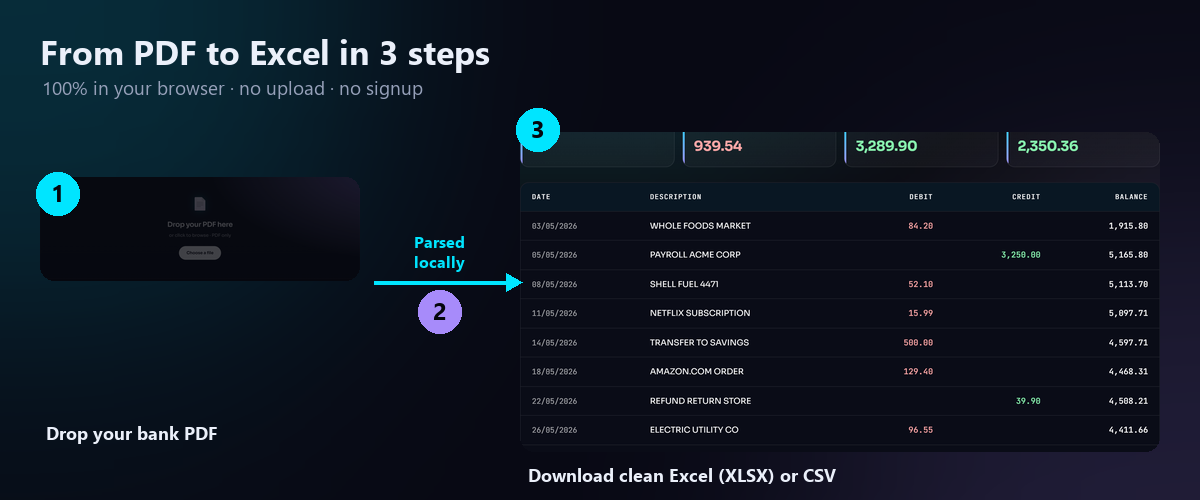
- Drop your PDF. Drag your Bank of America statement PDF onto the dropzone. Parsing happens instantly and entirely in your browser.
- Download Excel or CSV. Review the table (Date, Description, Debit, Credit, Balance) and download as Excel (XLSX) or CSV — ready for QuickBooks, Xero or Sage.
Open the Bank of America statement converter →
About Bank of America statement formatting
Bank of America uses Date / Description / Amount / Running Bal. for deposit accounts and a purchases/payments layout for credit cards — both convert to clean normalised columns.
Bank of America converter — FAQ
Does it support Business Advantage statements?
What about BofA credit cards?
Is it free?
Other bank statement guides
See all supported bank guides →
BankStmtConvert is an independent tool and is not affiliated with, endorsed by, or sponsored by Bank of America or any bank. Bank names are used only to describe compatibility; all trademarks are the property of their respective owners. Always review the extracted data against your original statement before relying on it.