Convert TD Bank bank statements to Excel & CSV
Turn your TD Bank statement PDF into a clean spreadsheet in seconds — free, private, processed entirely in your browser. No upload, no signup.

Manually retyping a TD Bank statement into a spreadsheet is slow and error-prone. BankStmtConvert extracts every transaction from a TD Bank PDF — dates, descriptions, debits, credits and balances — and exports it to Excel or CSV, ready for your accounting software. Everything runs locally, so your TD Bank data never leaves your device.
Convert your TD Bank statement now →Is it risky to convert a TD Bank statement here?
No — your data is never exposed. A bank statement is sensitive, which is exactly why BankStmtConvert never uploads it. Your TD Bank PDF is read and parsed entirely inside your browser using Mozilla's open-source PDF.js — it is never sent to us, stored, or seen by anyone. There is nothing to leak and nothing to delete. You can even disconnect from the internet after the page loads and it still converts.
How to download your TD Bank statement as a PDF
- Log in to TD (EasyWeb) or the TD app.
- Open Statements & Documents.
- Download the PDF.
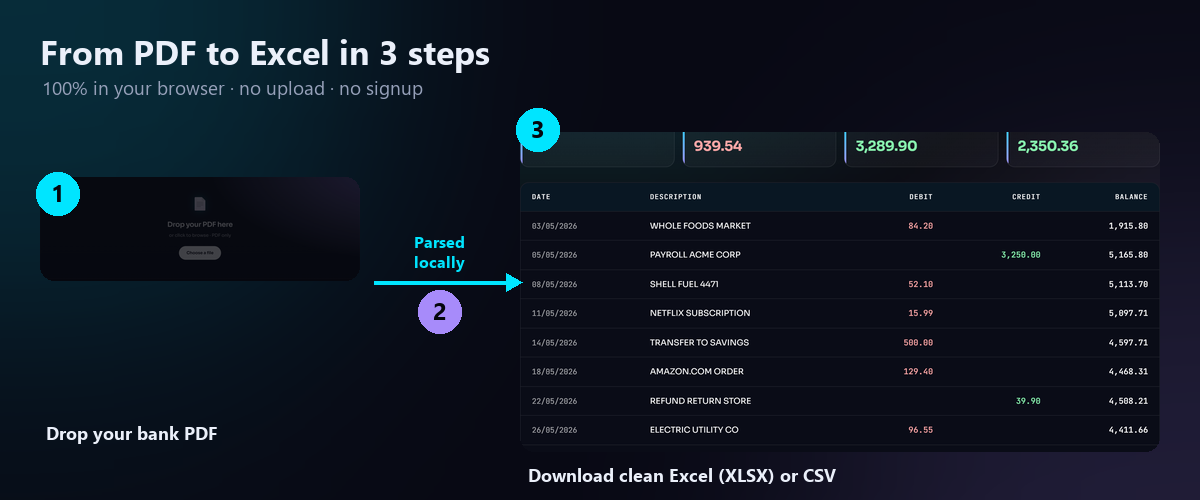
How to convert your TD Bank statement to Excel
- Open the free converter. Go to the BankStmtConvert converter — no signup, no install.
- Drop your PDF. Drag your TD Bank statement PDF onto the dropzone. Parsing happens instantly and entirely in your browser.
- Download Excel or CSV. Review the table (Date, Description, Debit, Credit, Balance) and download as Excel (XLSX) or CSV — ready for QuickBooks, Xero or Sage.
Open the TD Bank statement converter →
About TD Bank statement formatting
TD Canada Trust (CAD) and TD Bank US (USD) statements are supported. The parser reads TD's Date, Description, Withdrawals, Deposits and Balance layout and keeps debits and credits separate.
TD Bank converter — FAQ
TD Canada Trust and TD Bank US?
TD credit card statements?
Is my TD statement uploaded?
Other bank statement guides
See all supported bank guides →
BankStmtConvert is an independent tool and is not affiliated with, endorsed by, or sponsored by TD Bank or any bank. Bank names are used only to describe compatibility; all trademarks are the property of their respective owners. Always review the extracted data against your original statement before relying on it.